![emax-digital-logo-vertical-red-with-white-background-600x514.png]](https://knowledge.emax-digital.com/hs-fs/hubfs/emax-digital-logo-vertical-red-with-white-background-600x514.png?height=40&name=emax-digital-logo-vertical-red-with-white-background-600x514.png)
1. Push Status in the Tool
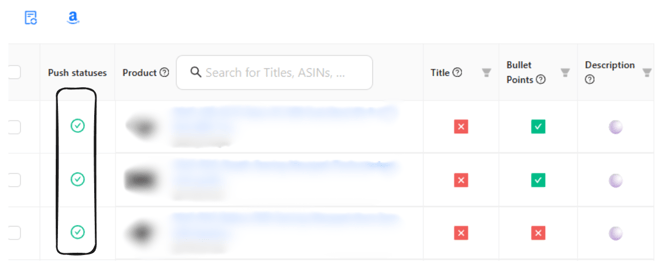
🟢 Green Status – Accepted by Amazon
-
Content was successfully transmitted via API
-
Amazon technically accepted the content
⚠ Important:
Even with a green status, content may not appear (or only partially appear) on the product page. This is often due to Amazon-internal processes (see section 3).
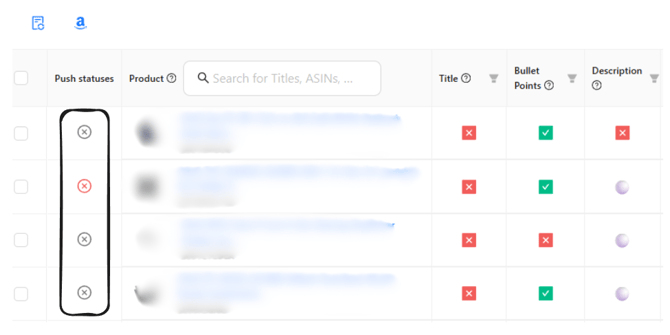
🔴 / ⚪ Red or Grey Status – Not Accepted
-
Amazon rejected the content
-
Content was not processed
In these cases, Amazon provides error messages via API, which are displayed in our tool.
2. Common Reasons for a Negative Status (Red / Grey)
A negative status usually means missing data or policy violations.
Missing or Incorrect Product Data
-
Missing/incorrect SKU
-
Missing vendor code
-
Incomplete master data at Amazon
Solution:
Correct the missing information directly in Amazon.
Formal Content Errors
-
Title longer than 200 characters
-
Invalid special characters
-
Incorrect structure
Solution:
Adjust the content in the tool and push again.
Content Policy Violations
For example:
-
Unauthorized warranty claims
-
Misleading advertising claims
-
Medical or legally sensitive statements
Solution:
Revise the content according to Amazon guidelines and resubmit.
3. Green Status but Content Not Displayed
Even if Amazon accepts the content, it may:
-
Not appear at all
-
Only appear partially
-
Not overwrite existing content
Possible reasons (outside our control):
-
Internal Amazon prioritization logic
-
Conflicts with other content (e.g., A+ Content, Brand Registry)
-
Caching or indexing processes
-
Vendor- or ASIN-specific restrictions
These processes are not fully transparent via API.
4. Recommended Actions
If status is green but content is not visible:
✅ Download the Excel report from our tool
-
Shows all affected products
-
Useful for structured analysis
✅ Contact Amazon Support
-
Ask specifically why the transmitted content is not displayed
-
Attach the Excel file as reference
✅ Continue automated processes
Manual and automated workflows should complement each other.
Our tool transparently reflects all available API status information and supports error analysis.
However, if content is accepted but not displayed, contacting Amazon Support is necessary.
If you need assistance, we’re happy to help.